Zentangle patterns › Zentangle art › City at Night
City at Night, a Zentangle-inspired landscape
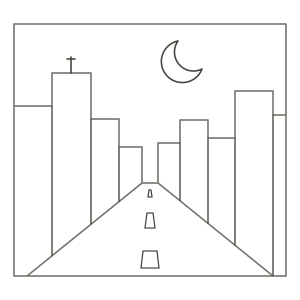
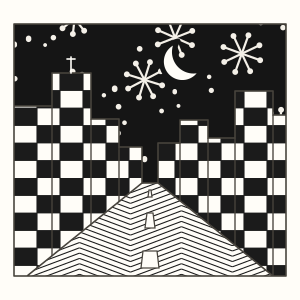
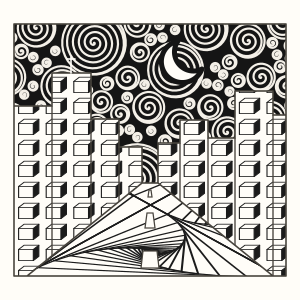
A crescent hangs over a street that narrows between the buildings. Use starbursts and bright windows in Window Glow, or try spirals and faceted windows in Midnight Mosaic.
Print the template and find the narrow end of the street between the buildings. Fill the sky, then the buildings, then the street. Leave the moon and lane markings clear.
Window Glow
- Night sky · Ahh
Start with a few starbursts above the lower roofs. Add smaller dots between them. Leave the crescent clear and darken the sky around the stars.
- Buildings · Knightsbridge
Start with a small grid in the tall building on the left. Fill alternating cells and leave some white to suggest lit windows. Restart the grid at each building edge.
- Street · Static
Start with a small zigzag just below the far end of the street. Echo the line down toward you. Leave more room between the closest lines.
Midnight Mosaic
- Night sky · Printemps
Start beside the crescent with a loose spiral. Add smaller spirals between the big ones. Leave the moon open and reverse the contrast with light lines on dark paper if you like.
- Buildings · Cubine
Start with one small square window. Add a second square offset by a little, then connect the corners and darken the side face. Repeat across the wider facades.
- Street · Paradox
Separate the street into triangles that open out toward the bottom edge. Draw nested turns from one corner of each triangle. Switch direction in the next one.
Finishing touches
Try leaving a cluster of nearby windows white while darkening the others. Keep the lane marks larger in the foreground and smaller at the far end of the street.
Adding a ledge or awning? Practise shading city details with a close-up of an awning and recessed windows.